How to Clean a Washing Machine Drain Pump Filter
If your front-load washer is draining slowly, leaving clothes wetter than usual, or giving off a musty laundry-room smell, the little drain pump filter may be the culprit. Cleaning it is a practical maintenance job many homeowners can do in 20 to 30 minutes with a towel, a shallow pan, and a little patience.
Most front-load washers use a pump filter to catch coins, buttons, lint, hair, and other small debris before they reach the drain pump. Several manufacturers recommend checking or cleaning this area as part of regular washer care, and LG specifically notes that the pump filter and related parts can be cleaned during monthly tub maintenance. ([lg.com](https://www.lg.com/us/support/help-library/lg-washer-how-to-clean-the-drain-pump-filter–20150206838321?utm_source=openai))
Before You Start: Check Your Washer Type
This guide is mainly for front-load washing machines with an accessible lower drain pump filter. On many models, the filter sits behind a small door near the bottom front of the machine. Some top-loaders and some front-loaders hide the filter inside the cabinet or do not have a user-accessible filter at all.
If you do not see a small access door, pause and look up your model’s manual before removing panels. Maytag notes that filter location and cleaning schedules vary by manufacturer, and Whirlpool says only some front-load models have an accessible drain pump filter. ([maytag.com](https://www.maytag.com/blog/washers-and-dryers/washer-filter-location.html?utm_source=openai))
Signs the Drain Pump Filter Needs Cleaning
A clogged or partly clogged pump filter can show up in small, annoying ways before the washer stops draining completely. Look for these signs:
- Clothes come out wetter than normal after the spin cycle.
- The washer takes longer to drain or pauses before spinning.
- You hear unusual humming or straining during draining.
- There is a sour or swampy smell near the washer.
- You find lint, pet hair, or grit building up around the door gasket.
- The machine displays a drain-related error code, depending on the brand.
Whirlpool explains that a clean pump filter helps prevent clogs and supports proper washer performance, while Samsung’s washer care guidance includes inspecting the drain pump impeller area for debris when cleaning the pump filter. ([producthelp.whirlpool.com](https://producthelp.whirlpool.com/Laundry/Washers/Product_Info/Washer_Cleaning_and_Care/Cleaning_the_Pump_Filter_-_Front_Load_Washer?utm_source=openai))
What You’ll Need
- Old towels or rags
- A very shallow pan, baking sheet, or plastic food container lid
- Small bowl or bucket, if your washer has a drain hose
- Soft brush or old toothbrush
- Warm water
- Flashlight
- Rubber gloves, optional but helpful
How to Clean a Washing Machine Drain Pump Filter
1. Turn the Washer Off
End the cycle, turn the washer off, and unplug it if you can safely reach the outlet. If the washer recently ran a hot cycle, give the water inside time to cool. You may be draining several cups of water, and it can be dirty.
2. Find the Filter Access Door
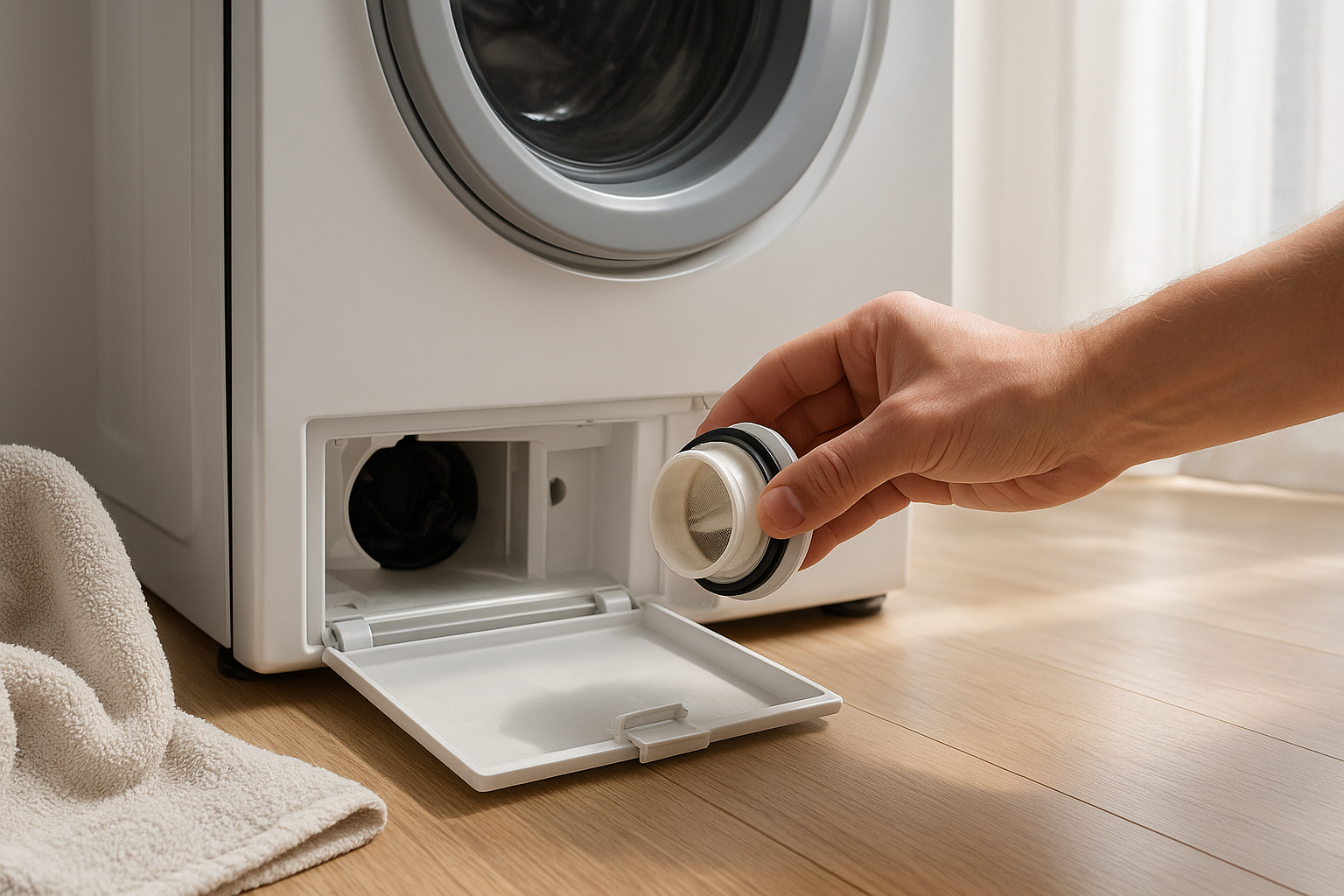
Look along the lower front edge of the washer for a small square or rectangular door. On many machines, it is on the left or right corner. Open it gently. You may need a flat tool, but avoid forcing it because plastic tabs can snap.
Inside, you will usually see one of two setups: a small capped drain hose plus a round filter cap, or just a round filter cap. LG’s instructions show the common drain-hose-and-filter setup on many front-load models. ([lg.com](https://www.lg.com/us/support/help-library/lg-washer-how-to-clean-the-drain-pump-filter–20150206838321?utm_source=openai))
3. Set Up for Water
Place a towel flat under the access area, then slide a shallow pan or tray under the drain hose or filter. This is the step that saves your floor. Even if the washer looks empty, water is often sitting in the pump housing.
If your machine has a small drain hose, pull it out carefully, aim it into the pan or bowl, and remove the cap. Let the water drain slowly. Replace the cap before moving to the filter. If the pan fills quickly, recap the hose, empty the pan, and continue.
4. Remove the Filter Slowly
Turn the round filter cap counterclockwise, but do it gradually. If water starts running out, tighten it slightly and let the pan catch up. Once the water slows, unscrew the filter fully and pull it straight out.
This part may be unpleasant. It is common to find lint, hair, coins, small screws, collar stays, hair pins, paper scraps, or a mystery clump of gray sludge. That is exactly why the filter is there.
5. Clean the Filter and Opening
Remove debris by hand, then rinse the filter under warm running water. Use a soft brush or old toothbrush to loosen lint and residue from the screen or grooves. LG recommends cleaning the pump filter and the filter opening with a soft-bristled brush and warm water. ([lg.com](https://www.lg.com/us/support/help-library/lg-front-load-washer-maintenance-CT00000305-1400786418920?utm_source=openai))
Before reinstalling the filter, shine a flashlight into the opening. Look for coins, buttons, hair ties, or anything wrapped around the small impeller inside. If you can remove loose debris easily, do so. Do not poke hard, pry, or force the impeller.
6. Reinstall the Filter Securely
Slide the filter back into place and turn it clockwise until it is snug. Do not cross-thread it, and do not leave it loose. A loose filter cap can leak during the next wash.
If your washer has a drain hose, make sure the hose cap is pushed in firmly and the hose is clipped back into its holder. Close the access door.
7. Run a Quick Leak Check
Wipe the floor dry, then run a rinse-and-spin or quick wash cycle with no laundry. Watch the lower access area for drips during draining. If you see water, stop the washer, check that the filter and drain hose cap are seated correctly, and try again.
How Often Should You Clean It?
A good rule for a busy household is to check the drain pump filter every one to three months. Clean it more often if you wash pet blankets, muddy clothes, lint-heavy towels, reusable mop pads, or small children’s clothing with lots of pockets.
For lighter laundry use, a seasonal check may be enough. The best schedule is the one in your washer manual, because designs vary. Maytag notes that the cleaning schedule depends on manufacturer instructions, while LG recommends including the drain pump filter when doing monthly tub-clean care on its front-load washers. ([maytag.com](https://www.maytag.com/blog/washers-and-dryers/washer-filter-location.html?utm_source=openai))
How to Keep the Filter Cleaner Longer
- Empty pockets every time. Coins, tissues, screws, and hair pins are classic filter cloggers.
- Use mesh bags for tiny items. Baby socks, washable nursing pads, and small delicates can slip into places they should not.
- Brush pet hair off blankets first. A few minutes outside can save the washer from a mat of fur.
- Use the right amount of detergent. Too much detergent can leave residue that mixes with lint and grime.
- Leave the door open after washing. This helps the drum and gasket dry, reducing musty smells.
When to Call for Repair
Cleaning the drain pump filter solves many slow-drain problems, but not all of them. Call a qualified appliance technician if the filter is clean and the washer still will not drain, the pump makes a loud grinding noise, the filter cap is stuck, the impeller appears damaged, or water leaks even after everything is tightened correctly.
You should also stop if your filter is not designed for easy access. Removing cabinet panels can expose wiring, sharp metal edges, and water connections. At that point, a service call is safer than turning a simple clog into a bigger repair.
The Bottom Line
Once you know where the access door is, learning to clean a washing machine drain pump filter is simple home maintenance. Drain the leftover water slowly, rinse the filter well, check the opening for debris, and reinstall everything snugly before running a test cycle. It is not glamorous, but it can help your washer drain better, smell fresher, and avoid unnecessary service calls.